What Are Future Objects in the ProcessPoolExecutor
Future objects are a promise for a result from an asynchronous task executed by the ProcessPoolExecutor.
In this tutorial you will discover Future objects used by Python process pools.
Let's get started.
ProcessPoolExecutor Returns Futures
The ProcessPoolExecutor in Python provides a pool of reusable worker processes for executing ad hoc tasks.
You can submit tasks to the process pool by calling the submit() function and passing in the name of the function you wish to execute in another process.
Calling the submit() function will return a Future object.
What are Future objects returned by the ProcessPoolExecutor?
A Future is a Handle on an Asynchronous Task
A Future object represents the asynchronous execution of a task.
Get a Future Object
You will not create a Future object yourself.
Instead, you will receive a Future object when calling the submit() function on your ProcessPoolExecutor.
...
# submit a task to the process pool
future = executor.submit(work)
The idea is that you hang on to the Future object and query it to check on the status of your task.
If you do not need to query the status of your asynchronous task or retrieve a result, you do not need to keep the Future object returned from a call on submit().
Future Object Status
You can check on the status of your asynchronous task via its Future object.
For example, you may want to check on the status of your task such as whether it is currently running, is done, or perhaps has been cancelled.
This can be achieved by calling functions on the Future object, for example:
...
# check if the task is running
if future.running():
	# do something...
The three functions you can use to check the status of your task are running(), done(), and cancelled().
- running() Returns True if the task is currently running, False otherwise.
- done() Returns True if the task has completed, False otherwise.
- cancelled() Returns True if the task was cancelled, False otherwise.
Future Object Results
You can also use the Future objects to get the result from the task or the exception if one was raised during the execution of the task.
This can be achieved by calling the result() function for the result and the exception() function to retrieve the exception.
- result() Returns the result of the target task function once complete, or None if the function does not return a value.
- exception() Returns the exception raised during the execution of the task once complete, or None if no exception was raised.
The result() and exception() functions only return once the task has completed, e.g. done() returns True.
This means that the calls to result() and exception will block until the task is completed. That is, the call will automatically wait until the task is complete before returning a value.
...
# get a result from the task once it is complete
result = future.result() # blocks
Future Object Timeouts
It is a good practice to limit how long you are willing to wait for a result or an exception.
As such, you can set a timeout when calling these functions via the "timeout" argument and specify a number of seconds.
If the timeout elapses before a result or exception is returned, then a TimeoutError is raised that you may choose to handle.
...
# handle any timeout
try:
	# get a result from the task once it is complete
	result = future.result(timeout=60) # blocks
	# do something...
except TimeoutError:
	# handle timeout
Future Object Exception Handling
If an exception is raised during the execution of the task, it will be raised again automatically when you attempt to retrieve the result from the Future.
As such, if an exception can reasonably be raised within the task, then you can handle it when retrieving the result.
...
# handle exception raised by the task
try:
	# get a result from the task once it is complete
	result = future.result() # blocks
	# do something...
except:
	# handle exception raised when executing the task
Future Object Callbacks
The Future object allows us to register a callback function to be called once the task has completed.
This can be achieved by calling the add_done_callback() function on the Future and specifying the name of our custom callback function.
...
# register a callback function
future.add_done_callback(custom_callback)
Our custom callback function must take a single argument, which is the Future object on which it is registered.
# custom callback function
def custom_callback(future):
	# do something
The callback is only called once the task has completed. You can register multiple callback functions for a given Future object and they will be called in the order that they were registered.
An exception in one callback function will not impact the calls to subsequent callback functions.
Multiple Future Object
If you call submit multiple times for different task functions or different arguments to the same task function, you can do so in a loop and store all of the Future objects in a collection for later use.
For example, it is common to use a list comprehension.
...
# create many tasks and store the future objects in a list
futures = [executor.submit(work) for _ in range(100)]
The collection of Future objects can then be handed off to utility functions provided by the concurrent.futures module, such as wait() and as_completed().
Now that we are familiar with how to use Future objects, let's take a closer look at the life-cycle of Future objects.
Life-cycle of ProcessPoolExecutor Future Objects
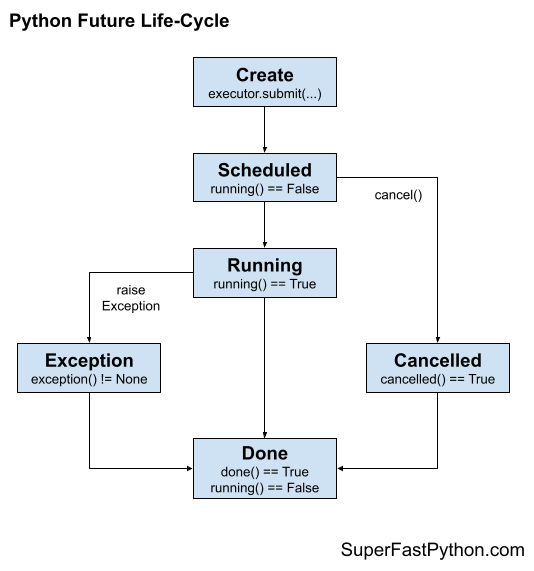
A Future object is created when we call submit() for a task on a ProcessPoolExecutor.
A Future object can exist in one of three states:
- Scheduled (pre-running)
- Running
- Done (post-running)
The figure below summarizes the life-cycle of a Future object.
Scheduled Future Object
After the Future object is created, it is queued in the process pool for execution until a worker process becomes available to execute it.
At this point it is not "running" it is pending or "scheduled".
A scheduled task can be "cancelled".
Running Future Object
A worker process will take a task off the internal queue and start executing it.
Once a task has started being executed the status of the Future object is now "running".
A running task cannot be cancelled.
Done Future Object.
When the task for a Future object completes, it has the status "done" and if the target function returns a value, it can be retrieved.
A "done" task will not be "running".
While a task is running, it can raise an uncaught exception causing the execution of the task to stop. The exception will be stored and can be retrieved directly or will be re-raised if the result is attempted to be retrieved.
A "cancelled" task will always be in the "done" state.
Takeaways
You now know how to use Future objects returned from the ProcessPoolExecutor.
If you enjoyed this tutorial, you will love my book: Python ProcessPoolExecutor Jump-Start. It covers everything you need to master the topic with hands-on examples and clear explanations.